Installation

Prev Next

STOP

In order to continue, you should have received a .zip file from Relay that will be used for the installation process.

Installing the Relay Package

Step #

Description

Salesforce Marketing Cloud

1

  • Select Package Manager from the Platform tab.

select package manager app

2

  • Select the Deployment tab, press the Deploy button and Select Upload from File

select deployment tab

3

  • Browse for the .zip file provided on the day of your integration and drop it into the Package Upload area.

browse for zip drag drop

4

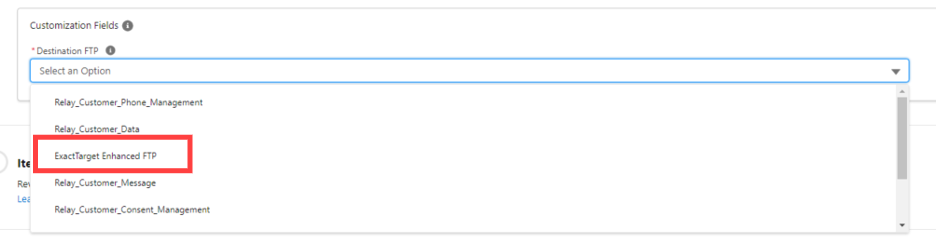
  • For Destination FTP, choose ExactTarget Enhanced SFTP.  Note: This is a temporary selection to move forward with the package installation.  We will come back to this section later to update the appropriate destinations.

5

  • Select Next under Package Customization.

select next package customization

6

  • Review the items to be deployed and then select Deploy under Item Validation and Usage.

  • After the deployment of the zip file is complete, the deployment details will be displayed in the window.

review click deploy

Creating the Application Package

Step #

Description

Salesforce Marketing Cloud

1

  • Login into Salesforce Marketing cloud using an administrator account.

  • Under the logged in user drop down menu, select Setup.

cfg setup

2

  • Under Setup → Platform Tools → Apps select Installed Packages

  • Click New

cfg new

3

  • Enter package Name and optional Description

cfg name desc